Switching structure
An indirect method fixes the structure of the solution: the times at which the control law changes, the jumps of the state or costate at these times, the sequence of arcs (bang, singular, boundary, …). A direct method does not: it returns values on a grid. A Solution keeps this structure in a SwitchingModel, given to build_solution with the switching keyword:
the switching times, strictly inside the time span;
one label per phase (
""for a phase with no label);the left and right limits of the state, costate and control at every switching time;
optionally, the left and right limits of the duals of the path constraints (
path_dual), when a multiplier jumps at a junction.
The trajectories of the solution stay single-valued and left-continuous: at a switching time, state(sol)(tᵢ) returns the value before the jump. The value after it is read with right_limit.
A solution with a jump
The state below jumps by +1 at t = 0.5, where the control switches from 1 to -1:
using CTModels

pre = CTModels.PreModel()
CTModels.time!(pre; t0=0.0, tf=1.0)
CTModels.state!(pre, 1)
CTModels.control!(pre, 1)
CTModels.dynamics!(pre, (r, t, x, u, v) -> (r[1] = u; nothing))
CTModels.objective!(pre, :min; lagrange=(t, x, u, v) -> 0.5 * u^2)
CTModels.time_dependence!(pre; autonomous=true)
ocp = CTModels.build(pre)

τ = 0.5
T = collect(range(0.0, 1.0; length=11))
X = reshape([t <= τ ? t : t + 1 for t in T], :, 1)
U = reshape([t <= τ ? 1.0 : -1.0 for t in T], :, 1)
P = zeros(length(T), 1)

switching = CTModels.SwitchingModel(;
    times=[τ],
    labels=["bang+", "bang-"],
    state=([τ;;], [τ + 1;;]),        # (left, right), one row per switching time
    costate=([0.0;;], [0.0;;]),
    control=([1.0;;], [-1.0;;]),
)
sol = CTModels.build_solution(ocp, T, X, U, Float64[], P;
    objective=0.0, successful=true, control_interpolation=:linear, switching=switching)
Solution ✓ successful
│ Objective : 0.0
│ Switching times : [0.5]
└─ Phases : bang+ → bang-The display lists the switching times and the sequence of phases; an unlabelled phase shows as ·.
Reading the structure
julia> CTModels.switching_times(sol)
1-element Vector{Float64}:
 0.5

julia> CTModels.phase_labels(sol)
2-element Vector{String}:
 "bang+"
 "bang-"

julia> CTModels.state(sol)(τ)                    # left-continuous: before the jump
0.5

julia> CTModels.right_limit(sol, :state, 1)      # after the jump
1.5

julia> CTModels.left_limit(sol, :control, 1), CTModels.right_limit(sol, :control, 1)
(1.0, -1.0)
A one-dimensional component is a scalar, as everywhere in CTModels.
When the trajectories are given as matrices, the interpolation uses the limits, so that the jump is not smeared over the grid cell that follows it:
julia> CTModels.state(sol)(0.55)                 # between the right limit 1.5 and x(0.6) = 1.6
1.55
Trajectories given as functions are used as they are.
Plotting
Each jump is drawn as a vertical segment, from the left to the right limit; a vertical line marks each switching time, with the look of the initial and final time markers; the phase labels are written on the control cell:
plot(sol)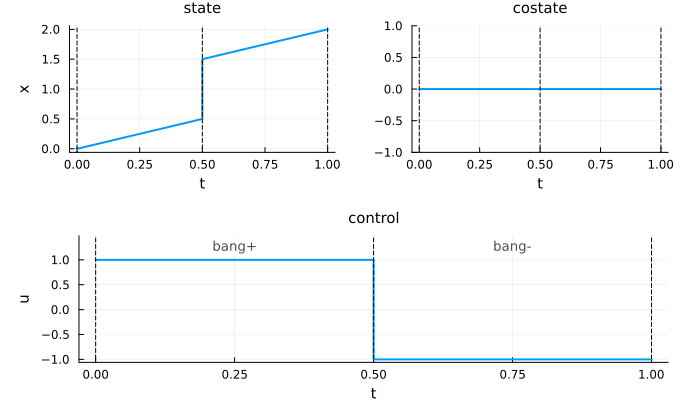
| Keyword | Values (default first) | Effect |
|---|---|---|
switching_style | NamedTuple() / a NamedTuple / :none | style of the switching-time lines, merged on the time markers' style; :none hides them |
phase_labels | :control / :all / :none | write the labels on the control cell (or on the first drawn group when the control is not drawn), on every group, or nowhere |
phase_labels_style | NamedTuple() | color, fontsize, halign, valign of the labels |
jumps | :segment / :none | draw a jump as a vertical segment, or break the curve between the two limits |
plot(sol; switching_style=(color=:red,), phase_labels=:all)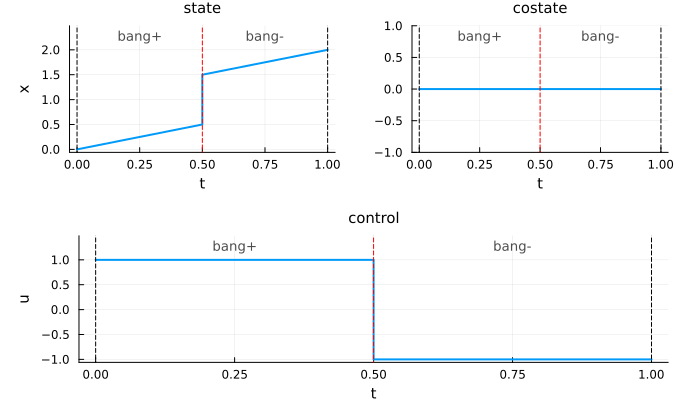
The vertical segment makes a jump easy to see, and to compare with a solution whose jump is smoothed, e.g. from a direct method. It does not mean that the trajectory takes the values in between: with jumps=:none, the curve stops at the left limit and starts again at the right limit.
plot(sol; jumps=:none)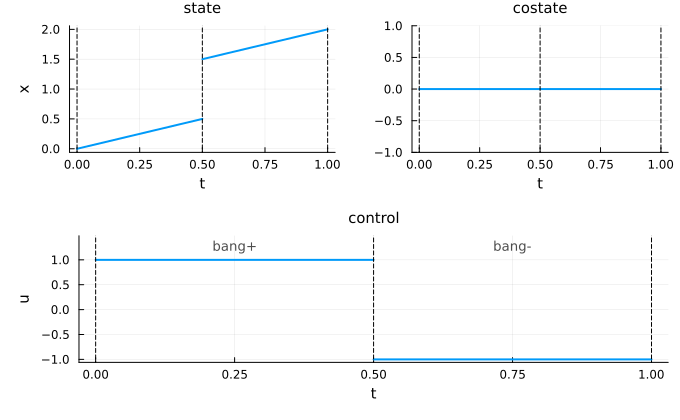
The whole trajectory keeps one color: the phases are parts of the same curve, not separate series. A solution drawn on top with plot! takes the next color, as usual.
Duals of the path constraints
A multiplier usually jumps at the entry and the exit of a boundary arc (0 on an interior arc, positive on the boundary arc). When the limits of the duals are given (path_dual), the dual panel draws the jump as the other panels do. The solution of a flow of CTFlows fills them.
pre = CTModels.PreModel()
CTModels.time!(pre; t0=0.0, tf=1.0)
CTModels.state!(pre, 1)
CTModels.control!(pre, 1)
CTModels.dynamics!(pre, (r, t, x, u, v) -> (r[1] = u; nothing))
CTModels.objective!(pre, :min; lagrange=(t, x, u, v) -> 0.5 * u^2)
CTModels.constraint!(pre, :path; f=(r, t, x, u, v) -> (r[1] = x; nothing),
    lb=0.0, ub=Inf, label=:xmin)
CTModels.time_dependence!(pre; autonomous=true)
ocp_c = CTModels.build(pre)

X = reshape([t <= τ ? 0.5 - t : 0.0 for t in T], :, 1)   # x reaches 0 at τ, then stays
U = reshape([t <= τ ? -1.0 : 0.0 for t in T], :, 1)
switching = CTModels.SwitchingModel(;
    times=[τ],
    labels=["interior", "boundary"],
    state=([0.0;;], [0.0;;]),
    costate=([0.0;;], [0.0;;]),
    control=([-1.0;;], [0.0;;]),
    path_dual=([0.0;;], [1.0;;]),    # μ = 0, then 1 on the boundary arc
)
sol_c = CTModels.build_solution(ocp_c, T, X, U, Float64[], P;
    objective=0.0, successful=true, switching=switching,
    path_constraints_dual=t -> [t <= τ ? 0.0 : 1.0])
plot(sol_c, :state, :control, :path, :dual)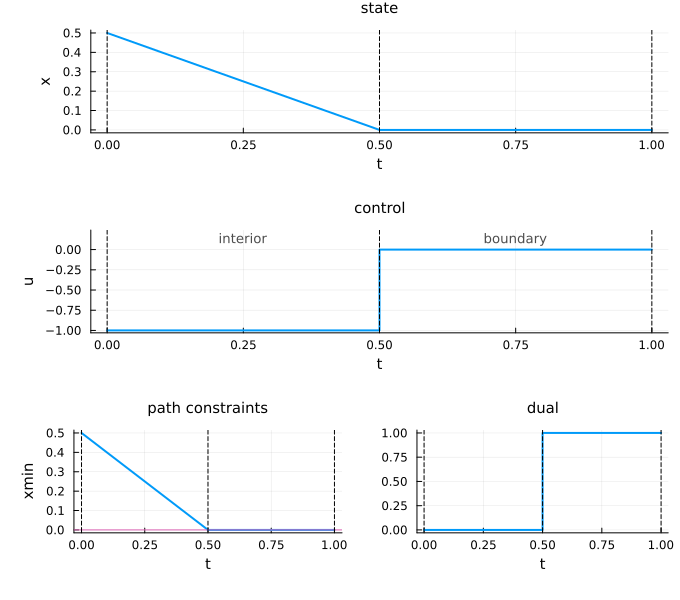
Saving and loading
export_ocp_solution writes the switching structure with the solution (JLD2 and JSON), and import_ocp_solution reads it back, so the imported trajectories keep their jumps. A file without switching structure, including a file written by an older version, is read with an EmptySwitchingModel.
Time grids have no repeated time
A trajectory takes one value at each time: a time grid with a repeated time raises an IncorrectArgument. A jump is stored in the switching model, not as a repeated time with two values.
julia> CTModels.build_solution(ocp, [0.0, 0.5, 0.5, 1.0], zeros(4, 1), zeros(4, 1), Float64[],
           zeros(4, 1); objective=0.0, successful=true)
ERROR: IncorrectArgument
│
│  repeated time in the state time grid
│
│  Got       time 0.5 appears more than once
│  Expected  a strictly increasing time grid (each time once)
│
│  Context   build_solution - validating the state time grid
│  Hint      Keep each time once. To store a jump at a switching time, give the left and right limits in `switching=SwitchingModel(...)`.
└─